

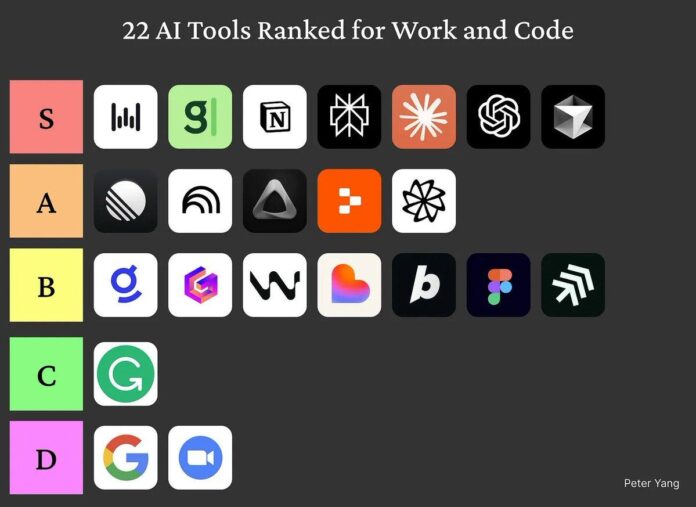

I tested 22 AI tools for work and coding and narrowed the field to seven that genuinely save time: WisprFlow (reliable AI voice notes), MeetGranola (clean AI meeting summaries), Notion (versatile AI agents for workflows), Perplexity (fast everyday searches), Claude Code (innovative coding assistant), Codex (planning and gnarly fixes), and Cursor (fast IDE with strong model integration). I recorded a full tutorial ranking and demoing all 22 tools live and published a written guide with screenshots, speed tests and recommended prompts. My evaluation prioritized time saved, integration, accuracy and developer ergonomics so you can pick the right tool for your workflow.
Top 7 Time-Saving AI Tools , Tested Across 22
I tested 22 AI tools across work and coding workflows and isolated seven that actually save meaningful time in real scenarios. WisprFlow stood out for dependable AI voice notes that cut meeting follow-ups; MeetGranola produced concise, editable meeting summaries; Notion’s AI agents automate recurring knowledge-work; Perplexity delivered rapid, context-aware research; Claude Code innovated on coding assist workflows; Codex handled planning and gnarly fixes well; and Cursor combined a fast IDE with strong model access. I published a live tutorial showing every test and a written guide with scores, so you can see the prompts, timings and caveats behind each ranking.
Read the Written Guide: Full Rankings & Notes

If you prefer to skim and bookmark, the written guide compiles every test, score and screenshot from the 22-tool sweep into a single reference. It lays out the scoring rubric (speed, reliability, integrations, pricing), short pros and cons for each app, and direct signup links so you can try tools immediately. The guide includes comparison tables for voice notes, meeting summaries, general research and coding workflows, plus the exact prompts I used to make results reproducible. Use it when onboarding teammates or validating which tool fits a team’s stack, it's the fastest way to replicate my experiments.
Watch the Live Ranking & Demos

The video demo walks through live, side-by-side tests: summarizing a multi-person meeting, debugging complex code snippets, and running quick research queries to illustrate latency, output quality and UX. I used identical prompts across tools and show timestamps for the seven finalists so you can jump directly to WisprFlow voice notes or Cursor’s IDE section. Watching the demo helps you spot re-prompt frequency, formatting differences and multi-step behavior that screenshots miss. If you want to evaluate fit for your team, the clip is the quickest way to see each tool behave in the wild.
Grok: Rapid, Casual , But Not Ready for Production

I covered Grok in the thread and, bluntly, it was a mixed bag. Grok is fast and conversational , great for brainstorming or quick takes , but during tests it sometimes hallucinated details in code and meeting recaps. That kind of looseness is fun for ideation but risky when you need precise, verifiable outputs. The linked deep-dive shows concrete examples where Grok confidently invented facts and where its conversational tone added noise rather than value. Short version: promising and entertaining, but treat outputs as first drafts and verify carefully before using them in production workflows.
Ranking Tiers Explained , Why Some Tools Landed in S+ or A

To make the results actionable I used tiered rankings: S+ for tools that were consistently fast, accurate and integrated smoothly; S for excellent options with minor tradeoffs; A for powerful tools that require a bit more setup or tolerance for edge cases. A tool in A can still save hours, S+ simply means near-zero friction and repeatable behavior across tasks. Some community members argued for bumps or drops, which is fair; my goal was reproducible tests across the same prompts and tasks, not hype. Use the tiers to match tools to your risk tolerance, budget and time-to-adopt requirements.
Why 'Workspace' Landed in D , A Nod to the Gemini Team

In my tests the product labeled “Workspace” ended up in the D-tier primarily because its end-to-end workflow and developer ergonomics lagged the top competitors. The raw model quality showed potential, but inconsistent formatting, slower interactions and missing integrations made it less useful for meeting summaries and coding fixes in my benchmarks. That said, I’m impressed with the Gemini team’s roadmap and rapid iteration, new releases are improving guardrails and integrations. The D-tier rating reflects today's practical utility for these specific tasks, not future potential. Keep an eye on Workspace; it could climb quickly with continued shipping.